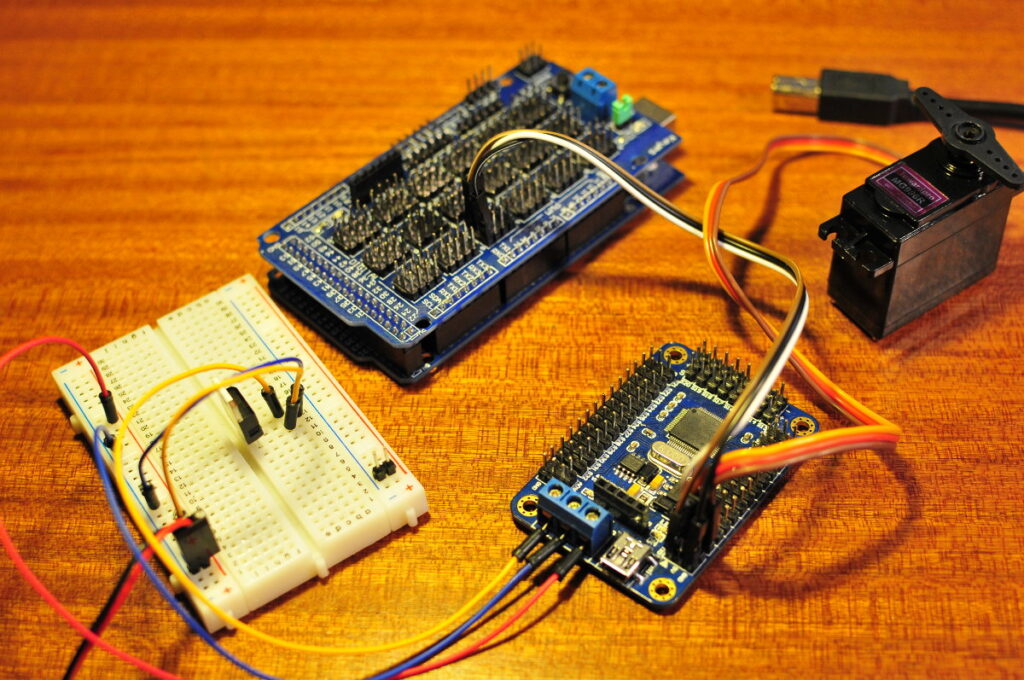
Torobot servo controller
I bought another “toy”, a 32 channel servo controller made by the Chinese company Torobot. It’s a small PCB with a dedicated micro controller that can control up to 32 servos. There is not much information to be found about it. There is an online manual available but it was not of much use to me.
A standard Arduino Uno can only control 12 servos. I would like to built a hexapod with 3 dof legs in the future, so that is 18 servos. That’s the reason I bought this board. It took me some time to figure out how the board works. The board comes with an USB connector and serial pins. The USB connector lets you connect it directly to your computer and with a small Windows program you can control the board. With this software you can actually make “actions” to control your servos and then upload these actions to the board. It even has some pre programmed actions to control a quadpod and hexapod robot. I want to use it with an Arduino so I connected the boards serial pins to the serial port of my Arduino Mega and tried writing a sketch to move one servo. It took me a lot of time and I needed a bit of help from the friendly people at Lets Make Robots till I had a sketch that worked. It’s actually not so difficult once you have figured out how it works.
Here is the sketch to control one servo with the board:
// http://www.bajdi.com
// Sketch to sweep one servo with a Torobot 32 channel servo controller
// Servo controller is connected to the serial pins (0 and 1)

void setup() {
Serial.begin(9600);
}

void loop() {
move(1, 2400, 500);
move(1, 750, 500);
}

void move(int servo, int position, int time) {
Serial.print("#");
Serial.print(servo);
Serial.print("P");
Serial.print(position);
Serial.print("T");
Serial.println(time);
delay(time);
}
Hi, i also have a one of these controllers. can u send me the link where u found the software.
Thanks in advance.
I found the software here on the bottom of the page: http://www.elechouse.com/elechouse/index.php?main_page=product_info&cPath=100_146&products_id=1883
I’ve done some more testing and found out that the controller only works with a baud rate of 9600. The manual states that the baud rate is automatically detected and a whole range of baud rates should be supported. I’ve tried different Arduinos, different serial ports on an Arduino Mega 2560 but can only get 9600 to work.
i have the 24 port version of the servo control board and cannot find any software or info on it so im guessing it cant be to different from the 32 port board made by the same people but i have so problems and a question help will be much appreciated
i need some help here i got the software from the link im on windows 7 OS and i cannot find how to tell it what port to use to assess the servo control board.
also how do you connect this control board to an arduino i cant find an adapter i am trying to run 8 micro servos off of the board i currently have a 4.5v power supply linked to support them
thank you for any help
I only use GNU/Linux @ home so can’t help you with the software problem. To use the board with an Arduino you just have to connect the serial pins (TX/RX) on the servo controller to the serial pins on your Arduino. TX goes to RX and RX goes to TX. The Arduino and servo controller must of course share a common ground. If you don’t have experience with Arduino serial communication I suggest you look at some examples on the Arduino website.
I’ve got the 16 channel version of this controller. I’m trying to get it to work with Linux (Ubuntu 12.10) but I’m not really sure where to start. Any ideas?
Are you familiar with python? Do a google search for python “usb serial communication”. I think that will be the fastest way to get you started.
I’m fairly good with python. I managed to get the controller and some servos setup under windows using pyserial. I’m trying to get it running in conjunction with a package called motion, hence the desire to get it working on Ubuntu. I can’t see the controller showing up anywhere in /dev, does that mean I need to get a driver and if so any idea where I could find one?
Hello Lachlan,
i bought a 16 channel version of this controller and i want to use with my pc where is installed Ubuntu.
did you solve your problem?
because my PC don’t recognizes the usb controller
how are you powering the robot? i am using a 6V but the robot is drawing current >2 Amps.
Thank you
Which robot? I have not used the torobot controller in a robot yet. I always use lipo batteries for my robots and ubecs/switch mode regulators to drop down the voltage.
hi, I have connected my arduino mega adk board to the servo controller with RX-TX and common ground. also, I could see the command sent through arduino console – serial monitor. but, the servo has no response. LED would not flash on the servo controller. so i think the servo controller is not receiving. could you foresee what might the problem?
thanks
Did you connect RX/TX to TX/RX? Provided the right power supply (see manual) to the controller? Try changing the baud rate, I only can get my controller to work at 9600.
I`ve just built my first hexapod but it came with a torobot ssc32
contoll board and a ps2 wireless controller but no manuals on how to set it up. can anyone please guide me? thanks.
Hi Derek,
I have the same problem…have you seen this document? http://www.torobot.com/down/usc32_ps2.pdf (translate into english)
I have made connections as explained there but I do not understand how it works…
I haven’t used the Torobot servo controller on my hexapod so I can’t give you any code…
i also have a UART usb ssc 32 board
Hi all!
I also spent to much time to finde drivers ))
And found them here – http://www.torobot.com/download
any one using the lynxmotoin hexapod?
HALO , I would like to know why you need extra connect the Arduino board to control the motor
How should it be done, tell us please!
Hi at all!
I have this board. I connected the PS2 wireless receiver with 7 wires to the board but i don’t understand how interface it…the software is unclear to explain it…someone has successful? This controller board is good and cheap but there is very little documentation…help me please!
Connecting a PS2 controller to the board??? How would that work? You would first need to program the micro controller on the Torobot controller to understand the messages of the PS2 controller. Just connecting these devices won’t make them work together. You still need some software to tell it what to do.
Yes of course. But in the Torobot documentations (poor…) they explain to create the action groups manually and then, like explain in this document: http://www.torobot.com/down/usc32_ps2.pdf (to translate into english) the software of the board recognizes the PS2 controller…we must associate the action groups with the corresponding keys into gamepad…but I have not figured out how to…if you take a look do you can help me to understand?
Thank you
Sorry, have never looked in to that. The Torobot software only runs on Windows, I don’t have a Windows computer. I also don’t have a PS2. I was only interested in the controller to interface it with a micro controller.
Hello,
I just got a torobot board like that one, and after connecting all the motors every time I move a servo a buzz came from the servo and never stops, did that happen to you also? do you know what can be the reason?
Sorry I don’t have a crystal ball… My guess would be that your power supply isn’t strong enough.
Hello admin,
what do you mean with “It even has some pre programmed actions to control a quadpod and hexapod robot”?
It’s almost a year ago that I have last tested the controller, I don’t remember it really. I had to go trough a lot of trouble to try out the Torobot software as I don’t have a PC with a windows operating system. If I remember right you can select some actions in the software to make a hexapod or quadpod.
Hi guys glad to see this site I bought the hexapod kit and torobot servo controller off ebay and have really struggled to find info…
fwiw http://www.torobot.com has been my best source up till now.
I also found there’s a node.js npm module called “torque” that supports the torobot controller I tried it yesterday and I was able to move some servos with it…
Has anybody gotten a bluetooth serial adapter working with the torobot controller btw? I have this one but I tried yesterday and it didn’t work – I had not reversed rx and tx maybe that was my problem?
http://apirola.wordpress.com/2012/09/05/setup-jy-mcu-bt-board-v1-2/
Hi Darren,
you know how to use the Rios program for the board well?
You make a sequence for the walking of the hexapod? I don’t understand well the simmetry interface (click option)…
HI to all
Did you manage to get the Ps2 controller connected and working i have one of these boards and have got it working over bluetooth but tried it with the ps2 and dont understand the software can anybody help.
many thanks
Hello,
I have the same problem…Also, the board do not connect more with my pc via usb…error of port number and baud rate…I’ve never had problems before…someone knows a reset on the board?
Many thanks
I bought a plate of these Torobot 32 control servo.
I do not know how to connect the control board on the ps2!
I wonder if you can help me?
may be using an Arduino or otherwise!
I thank the group des now!
I don’t have a PS2, have you checked the Torobot manual?
So I think I explained wrong!
Actually i want to connect a (PlayStation 2) Control Aboard!
The manual does not help much!
And so the plate and ToRobot control software + Ps2 Controller!
Head over to my blog for a real basic example of the wireless ps2 controller on a Uno and sending commands to the torobot controller.
Justcheckinm8.blogspot.co.nz
Better late than never, but hope it helps.
Hello,
ho can i reprogram or upload my own progrmm on the board?
can i use the arduino software?
You need an external MCU (like an arduino) which is responsible for sending data to the servo controller. The torobot controller is simply the receiver of serial data and acts in accordance with the data sent to it…ie #[port number]P[position]T[time to complete the move in milliseconds]
@SH, thanks alot,,
i have arduino mega but i donot know how to wire it with torobot
i think i have to wire tx and rx is that right?
Arduino Torobot
TX TX
RX RX
is that right?
TX-RX
RX-TX
Hello world! Try this one. All rotated through the PS2.
#include //for v1.6
PS2X ps2x; // create PS2 Controller Class
int error = 0;
byte type = 0;
byte vibrate = 0;
void setup(){
Serial.begin(9600);
error = ps2x.config_gamepad(13,11,10,12, true, true); //setup pins and settings: GamePad(clock, command, attention, data, Pressures?, Rumble?) check for error
}
void loop(){
//DualShock Controller
ps2x.read_gamepad(false, vibrate); //read controller and set large motor to spin at ‘vibrate’ speed
Serial.print(“#1P”);
Serial.print(map(ps2x.Analog(PSS_LY),0,255,900,2400)); // Read the left joystick values
Serial.print(“#2P”);
Serial.print(map(ps2x.Analog(PSS_LX),0,255,900,2400));
Serial.print(“#3P”);
Serial.print(map(ps2x.Analog(PSS_LX),0,255,2400,900));
Serial.println(“T500”); //Send the string off to the controller board
delay(80);
}
Just ensure the “include” line reads “include PS2X_lib.h”
Your code is a modified copy of the code in my blog (see my previous comment above), and the sample I showed got truncated by the blog editor.
Yes, I did not notice the link above! Ok.
I have a torobot 32servo controller in past it would get detected and com port was available now I am facing a problem in com-port detection
The power led’s intensity is gradually decreasing,what should I do kow
Can anyone tell me how I can operate the servos from my PS2 controller, like a RC system?
[…] http://www.bajdi.com/torobot-32-channel-servo-controller/ […]
Does your servos or board have a high pitch hum/whine when the servos are powered on? For power, how much power are you passing through VS and VSS? Also, what’s the transistor for?
Sorry for all the questions, really curious about your setup.